
SecureCRT Feature - Chat Window
- Tools |
- How to |
- command line
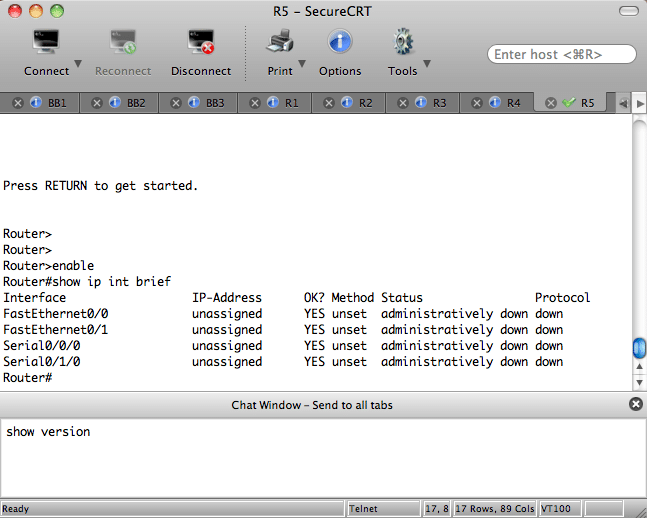
If you are a SecureCRT user, you might find a certain feature useful when configuring multiple devices via CLI. The feature is called Chat Window and it's not what it appears at first glance.
When I first saw the Chat Window feature listed in the View menu, I assumed it was some sort of remote tech support option or a way to collaborate with multiple users. Although it is certainly possible to use it to "chat" using the IOS Send command, it is far more powerful as a quick way to configure several routers or switches at the same time.
Here's how it works...
1) Open SecureCRT and connect to at least two devices using Tabs.
2) Go to the View menu and select Chat Window if it is not already checked.
3) Now type something in the window that appears at the bottom of SecureCRT and be amazed as it sends it to all tabs simultaneously.
This comes in really handy when you want to want to delete vlan.dat
and write erase all your lab gear before reloading. If you have a
terminal server, you can do the same thing using the "send *" command,
but I've found using the chat window is a little faster since it's
already open at the bottom of the window.
For reference, SecureCRT has a writeup for this feature on their website located here. Give it a try and let us know what you think in the comments below.

Comments
You also have to right-click
You also have to right-click on the chat window and select Send Chat to All Sessions.
Thanks for the tip Adam. This
Thanks for the tip Adam. This comes at a really good time actually as I'm studying for CCIE as well and am too cheap to buy a Cisco console server. I just bought a digi box as a console server for $30. I was kind of worried about having to type in commands like show ip route even with alias's configured. It would take a lot of time to switch to each tab! This will definitely save me some time in my studies!
Also thanks for the tip about right clicking. :)
"...bought a digi box as a
"...bought a digi box as a console server", it sounds interesting, could you please be more specific? I'm looking for a cheap console/access server as well.
Regards,
Nhan.
Avocent
I have had luck with a 16 port Avocent. Got it on Ebay.
I came across this recently also.
This is a great feature of CRT as it the fact it is so easy to write scripts for. It even made it on to my blog to.
I would say be careful with this though.
I was telling one guy about it, he ran of raving about how cool it was, until he managed to sent a reboot command to two device at the same time. Unfortunately he did not mean to and rebooted the active and standby device at the same time!!
saved my life
Dudeeee... this saved my life.. fortunately i've read it a week before i needed it.
I had to disable cckm on maybe 1000+ cisco 1200 stand alone access points that' around 90 sites.
Fortunately I had all the session saved on my secure crt for every site.. so I had to do it site by site which every site contains 10+ APs.
I did it site by site and it saved my life... done it very quick :]
thanks a bunch.
For many devices is also very
For many devices is also very quick to write scripts in SecureCRT. You can even record macros that you can run against mutipl devices. And whats more this allow you to read the output of commands and have the script take actions on them.
Tied in with EXCEL or test files with lists of devices, and VB script and you can automate tasks very easily with SecureCRT. Port Audits are one.
with Konsole
You can even do more with konsole, which is a free program by the way. You can do the same thing and also select the tabs you want the output to go to by doing: Edit -> Copy Input to {All tabs, select tabs, None}
Thanks
Thanks for the tip, this is handy for some of the work I routinely do.